Cloud-Based PACS Solutions: A Practical Guide for Imaging Centres
Cloud has become the default for new software in most sectors, and medical imaging is steadily following. But imaging carries specific requirements — very large files, strict data protection rules and clinical uptime expectations — that make the cloud decision more nuanced than it is for ordinary business software. This guide explains what a cloud-based PACS is, how it compares with on-premise and hybrid models, and what European imaging centres should weigh before migrating.
What is a cloud-based PACS?
|
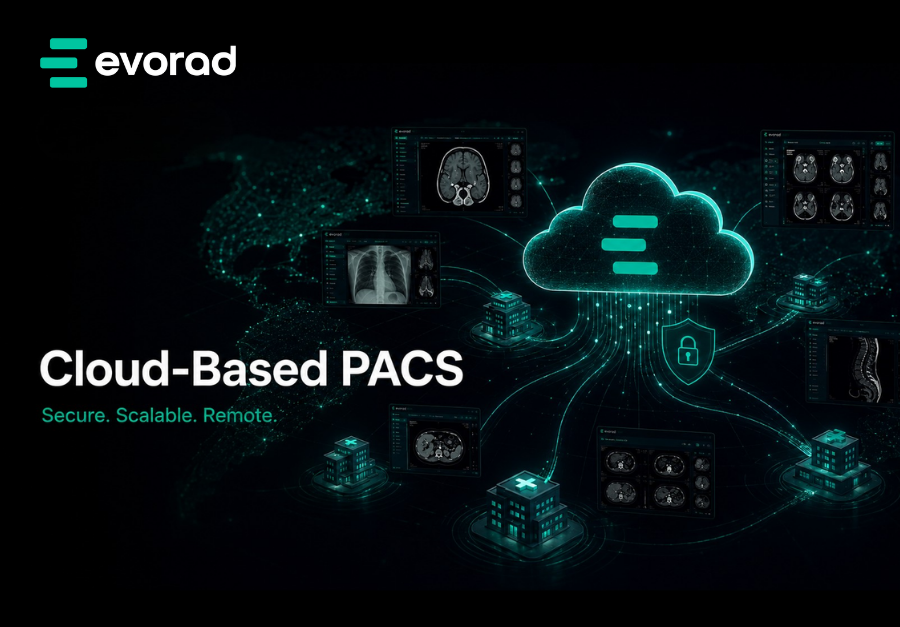
Definition A cloud-based PACS is a Picture Archiving and Communication System hosted on remote, professionally managed infrastructure and accessed over the internet, rather than on servers physically installed at the imaging centre. Images are stored, processed and viewed through cloud services, typically on a subscription model, with the vendor responsible for hardware, security patching and scaling. |
The shift is as much commercial as technical. A traditional on-premise PACS is a capital purchase: the centre buys servers, storage and licences, and owns the cost of running them. A cloud-based PACS is an operating expense: the centre pays for a service and the provider carries the infrastructure. That difference shapes budgeting, scaling and how quickly a centre can go live.
Cloud vs on-premise vs hybrid PACS
There is no single correct model. The right choice depends on the centre’s size, growth plans, connectivity and risk appetite.
| Factor | Cloud | On-premise | Hybrid |
| Infrastructure | Vendor-hosted | Centre-owned servers | Mix of both |
| Upfront cost | Low — subscription | High — capital purchase | Moderate |
| Scalability | Elastic, on demand | Limited by hardware | Flexible |
| Maintenance | Vendor-managed | Centre’s IT team | Shared |
| Access | Anywhere, any approved device | Mainly on-site | Anywhere, with local cache |
| Disaster recovery | Built in, geo-redundant | Must be designed and funded | Built in for cloud tier |
| Best suited to | Growing and multi-site centres | Centres with strict on-site needs | Centres with variable connectivity |
Benefits of a cloud-based PACS for imaging centres
Lower upfront investment
A cloud-based PACS converts a large capital outlay into a predictable operating cost. There is no server room to build or refresh, which is particularly valuable for independent centres where capital is tied up in scanners and premises.
Capacity that scales with volume
Imaging data grows relentlessly. Cloud storage and compute scale up as study volume rises, so a centre does not face a disruptive hardware upgrade every few years or have to forecast capacity far in advance.
Access from anywhere
Because the system is reached over the internet, a cloud PACS naturally supports multi-site operations, home reporting and teleradiology cover — without replicating infrastructure at every location.
Built-in resilience
Reputable cloud providers offer geo-redundant storage and professionally managed disaster recovery. Achieving the same resilience on-premise requires a second site and significant investment.
Faster go-live
With no hardware to procure and install, a cloud deployment can move from contract to clinical use far more quickly than a traditional on-premise project.
Security maintained by specialists
Patching, monitoring and threat response are handled continuously by a dedicated team, rather than competing for attention with every other task on a small IT department’s list.
Common concerns — and how to address them
Caution about cloud is reasonable. Each of the usual concerns has a practical answer that a centre can check during procurement.
- Data security. Look for encryption in transit and at rest, granular access controls, full audit logging and certified data centres. Ask the vendor how breaches are detected and reported.
- Data residency and GDPR. Choose a provider that can host data within the EU or EEA, disclose its sub-processors, and sign a data processing agreement.
- Connectivity and image load speed. Modern streaming, zero-footprint viewers load images progressively, so a study opens quickly even over an ordinary connection; hybrid caching helps sites with weaker links.
- Review the service-level agreement, the provider’s redundancy design and its published uptime history.
- Vendor lock-in. Insist on standards-based, DICOM-compliant data export and clear contractual exit terms before signing.
GDPR and data residency for European imaging centres
Medical images are special-category personal data under the General Data Protection Regulation, which means they attract the highest level of protection. For a cloud PACS, three points deserve particular attention.
First, the imaging centre is normally the data controller and the cloud PACS vendor is a processor, so a written data processing agreement is required. Second, prefer EU or EEA data residency and understand exactly where both live data and backups physically sit. Third, look for recognised information-security certification and a clear, documented breach-notification process.
This section is general guidance for orientation, not legal advice. Confirm your specific obligations with a data protection specialist or your data protection officer.
Total cost of ownership: looking beyond the licence fee
Comparing a cloud subscription with an on-premise purchase on headline price alone is misleading, because the two models hide their costs in different places. A full total-cost-of-ownership view gives a fairer comparison.
An on-premise PACS carries the visible capital cost of servers, storage and licences, but also recurring costs that are easy to overlook: power and cooling, server-room space, hardware refresh every few years, software upgrades, and the IT staff time spent maintaining it all. A genuine disaster-recovery capability, if the centre wants one, means a second site and a second set of equipment.
A cloud PACS folds most of those costs into a single subscription, so a fair comparison sets the on-premise capital purchase and its running costs against the cloud subscription over the same multi-year period. For many growing centres, the cloud model also removes a less tangible cost — the risk and disruption of a major re-platforming project every hardware cycle.
Signs your imaging centre is ready for cloud
Not every centre needs to move to the cloud immediately, but several signals suggest the timing is right.
- You are opening or acquiring additional sites and do not want to replicate infrastructure at each one.
- Your current hardware is approaching end of life and a costly refresh is due.
- Radiologists need to read from home or across locations, and remote access is currently awkward.
- Your IT capacity is small and increasingly consumed by maintaining the existing PACS.
- Storage is filling up faster than you can plan for, and capacity decisions feel like guesswork.
If several of these apply, a cloud or hybrid model is likely to remove more problems than it introduces.
How to migrate to a cloud-based PACS
A migration is a project, not a switch. A structured approach keeps clinical service running throughout.
- Audit your current estate — data volume, modalities, integrations and any legacy archives or CDs.
- Define your requirements — data residency, uptime, viewer capability and RIS integration.
- Shortlist vendors and verify standards compliance, EU hosting and exit terms.
- Plan the data migration — ingest and validate legacy studies so priors remain accessible.
- Run a hybrid transition where appropriate, to reduce disruption during cut-over.
- Train staff and referrers on the new viewer and portal before go-live.
- Decommission legacy hardware only once the migrated data is fully verified.
Cloud-native, hybrid or on-premise: matching the model to the centre
Most growing imaging centres settle on a cloud-native or hybrid model, because both remove the capital and maintenance burden while keeping the flexibility to cache data locally where connectivity demands it. A cloud-native PACS for imaging centres that also offers hybrid and on-premise options lets a centre choose the storage model that fits today and change it later without re-platforming.
Evorad addresses this with evoCloudSafe for secure cloud delivery and evoVault for tiered, scalable archiving, both designed to integrate transparently with the diagnostic workflow in evoViewer.
Choose the storage model that fits your centre
Cloud, hybrid or on-premise — the right answer depends on your centre, not on a vendor’s default. See the storage options behind the cloud-native PACS for imaging centres, or book a 20-minute demo.
Frequently asked questions
Yes, when properly implemented. Security rests on encryption, access control, audit logging and certified data centres. The level of protection depends on the vendor’s practices and how the system is configured, so both should be checked during procurement.
Cloud hosting can be fully GDPR compliant. The imaging centre remains the data controller, so it should ensure a data processing agreement is in place, choose EU or EEA data residency, and confirm clear disclosure of any sub-processors.
eb and HL7/FHIR) to present multi-vendor environments through one interface. Many platforms combine both approaches depending on the client.
It is usually priced as a subscription based on volume, users or storage, rather than a large upfront capital purchase. When comparing quotes, include migration and integration effort in the total cost.
Not with a modern, zero-footprint streaming viewer, which loads images progressively so a study opens in seconds. Hybrid caching can further improve performance at sites with limited bandwidth.
Yes. A planned migration ingests legacy archives and CDs into the cloud system, and a hybrid transition period reduces disruption while the change is completed.