PACS migrations have a reputation, and it is mostly deserved: projects that overrun, priors that go missing at go-live, radiologists reading around two systems for months. Yet the failures are rarely mysterious. The same handful of skipped steps — no data audit, no parallel-run plan, no validation criteria — cause most of the pain.
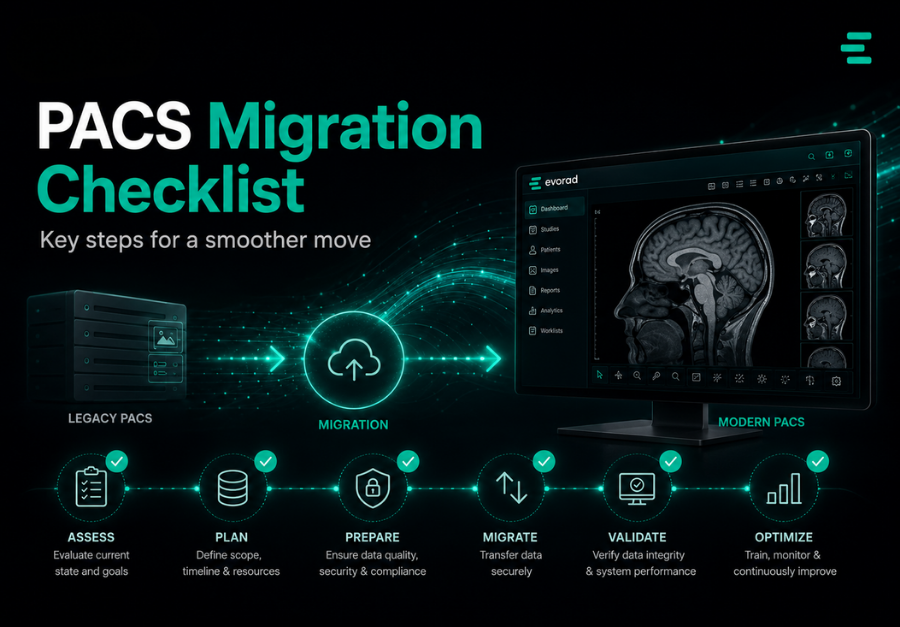
This checklist walks through a migration in the order the decisions actually arrive: recognising when migration is unavoidable, auditing what you have, choosing a migration approach, planning for downtime, validating the result, and the questions to put to vendors before you sign anything.
When migration becomes unavoidable
Organisations rarely migrate for fun. The usual triggers are end-of-life or end-of-support announcements, contract expiry with unacceptable renewal terms, vendor acquisition and roadmap uncertainty, performance that no longer matches volumes, consolidation after mergers, or a strategic shift — typically towards cloud or hybrid deployment and unified multi-site reading.
One planning truth is worth stating early: the migration of the archive is usually a bigger project than the installation of the new PACS. If years of studies live inside the outgoing system in proprietary structures, extracting, converting and validating them dominates the timeline. This is also why organisations increasingly separate the archive into a vendor neutral archive first — so the next migration is a re-pointing exercise rather than a data rescue.
Before any technical work, settle the governance. Successful migrations have a named executive sponsor with budget authority, a clinical lead with the standing to make workflow decisions stick, a project manager who owns the plan, and a decision log that records what was agreed and why. Migrations fail politically as often as technically — usually when go-live pressure meets an unresolved disagreement that should have been settled in month one.
Timing matters as much as trigger. The worst migrations are negotiated under deadline pressure — support expiring in four months, renewal terms arriving as an ultimatum. If any trigger is visible on an eighteen-month horizon, start the audit now: an organisation that knows its data, integrations and requirements negotiates from strength, while one that discovers them during vendor selection negotiates from need.
Step 1: the pre-migration audit
You cannot migrate what you have not measured. Before approaching vendors, build an honest inventory:
- Data volume and growth: total studies, total storage, annual growth rate, modality mix.
- Data quality: duplicate patients, inconsistent identifiers, broken studies, non-standard or private DICOM tags the current system relies on.
- Metadata consistency: study descriptions, procedure codes and series naming — inconsistencies here sabotage priors matching and hanging protocols in the new system. (Our guide to study description normalisation covers why this matters.)
- Retention obligations: what must be kept, for how long, by study type and jurisdiction; what can legitimately be excluded from migration.
- Integration map: every inbound and outbound connection — modalities, RIS/HIS, EHR, dictation, portals, AI tools — with interface specifications where they exist.
- Workflow inventory: hanging protocols, worklist rules, user roles and site-specific configurations that must be recreated or improved.
The audit will surface problems; plan the remediation as its own workstream rather than a surprise. Duplicate patient records need merge decisions with clinical sign-off, inconsistent study descriptions need a target vocabulary before conversion, and dependencies on private tags need explicit handling agreed with the incoming vendor. Budget real time for this: data remediation is routinely the schedule item that was estimated in weeks and delivered in months, precisely because it was treated as a footnote.
Do not overlook the human inventory alongside the technical one: who holds the institutional knowledge of the current system’s quirks, which configurations exist only in one administrator’s head, and who will actually be available during the migration months. Key-person risk sinks migrations as reliably as bad data — and the mitigation, documenting tribal knowledge before the project depends on it, costs a few workshops now against weeks of archaeology later.
Step 2: choose the migration approach
- Big-bang: everything migrates, then everyone switches on a defined date. Cleanest end-state, highest short-term risk; suits smaller archives and single sites.
- Phased: sites, modalities or time-ranges move in stages. Lower risk per stage, but a longer period of running two environments and keeping them coherent.
- On-demand (migrate-on-access): recent studies move up front; older studies migrate when first requested, with a background trickle completing the rest. Fastest go-live and often the most practical for large archives — but it demands reliable bridging so priors remain available throughout.
- Hybrid patterns: commonly, the last 2–3 years migrated up front (covering the vast majority of prior-retrieval requests) plus on-demand for the deep archive.
Whichever approach you choose, insist on a written prior-availability guarantee for the transition period: radiologists should never discover mid-read that a comparison study is stranded in the old system with no retrieval path.
Be equally realistic about physics. Archive transfer runs at the speed of your infrastructure — extraction from the legacy system, network throughput, ingestion and indexing on the new — and large multi-year archives take the time they take. This is a second argument for on-demand and hybrid patterns: they decouple go-live from total transfer completion, letting the organisation switch when the operationally relevant data is ready rather than when the last decade-old study has trickled across.
Step 3: plan downtime and the parallel run
- Define the cutover window and the downtime workflow: how are urgent studies read if both systems are briefly unavailable? Who is on call, and how are reports issued and later reconciled?
- Run the systems in parallel for a defined validation period, with clear rules on which is the system of record for new studies.
- Keep the old system in read-only mode after cutover for an agreed period — it is your safety net for disputes and stragglers.
- Schedule cutover for your genuinely quietest period, and communicate dates to referrers, not just internal staff.
- Rehearse rollback: if validation fails at go-live, everyone should already know exactly how to revert.
Fold training and communication into the same plan, not a separate afterthought. Radiologists need hands-on time with the new viewer and worklists before cutover week, not during it; technologists need the new sending and QC procedures; referrers need to know what changes for them, even if the answer is ‘nothing except the portal looks better’. The measure of readiness is simple: on cutover morning, nobody important is seeing the system for the first time.
Establish a go-live command structure for cutover week: a single decision-maker on call, a war-room channel where issues are logged and triaged, vendor engineers reachable with named response times, and twice-daily checkpoints against the validation criteria. Most go-live issues are small; what turns small issues into bad weeks is nobody being empowered to decide quickly.
Step 4: validation and sign-off
Define acceptance criteria before migration starts, and make final payment milestones depend on them. At minimum:
- Counts reconcile: studies, series and images in the target match the audited source inventory, with every exclusion documented and justified.
- Integrity sampling: a statistically meaningful sample of migrated studies opened and visually verified across modalities and age bands, including measurements and annotations where supported.
- Metadata fidelity: identifiers, dates, descriptions and report links intact; priors matching works on real patient histories.
- Workflow verification: worklists, routing rules, hanging protocols and integrations exercised with live-like traffic before the old system is retired.
- Performance under load: study open times and prior retrieval measured at realistic concurrency, not on an empty system.
Document the validation as if a regulator or a lawyer will one day read it — because one day, one might. The migration record should show what existed in the source, what was migrated, what was excluded and on what basis, what sampling was performed and what it found, and who signed off each criterion. This file is also your protection in the rare dispute over a study’s whereabouts years later; assembling it during the project costs little, and reconstructing it afterwards is close to impossible.
Questions to ask every vendor
- Who performs the data migration — you, a subcontractor, or us — and who owns errors discovered after sign-off?
- What is the fixed cost of migration, and what precisely triggers additional charges?
- How do you handle our known data-quality issues: duplicates, private tags, inconsistent descriptions?
- What is the prior-availability mechanism during transition, and what is its measured retrieval time?
- What are our exit terms from your system: extraction format, cost and timescale, in writing?
- Can we speak to two references who migrated a comparable archive size from our current vendor?
The exit-terms question matters even when you have only just arrived. The best moment to prevent the next painful migration is while negotiating this one — which is also the strongest argument for standards-based storage and an independent archive layer from day one.
Score the answers, not the confidence. Vendors differ less in whether they claim these capabilities than in whether they will commit to them in writing with numbers attached — fixed migration cost, named prior-retrieval times, documented exit terms. The contract schedule is where migration promises become real; anything that lives only in the sales conversation should be treated as decoration.
The condensed checklist
- Inventory data, quality issues, integrations and retention obligations.
- Decide what migrates, what is excluded, and on what legal basis.
- Select migration approach (big-bang / phased / on-demand) and prior-availability guarantees.
- Contract fixed migration scope, acceptance criteria and exit terms.
- Clean metadata before it moves, not after.
- Plan cutover, downtime workflow, parallel run and rollback.
- Validate counts, integrity, metadata, workflow and performance.
- Keep the legacy system read-only for a defined grace period.
- Hold a post-migration review and archive the lessons with the project record.
One final habit separates organisations that migrate well from those that merely survive it: they treat the checklist as a living project artefact — reviewed at every milestone, with each item owned by a named person and marked with evidence, not intentions. A checklist nobody signs is a poster; a checklist with signatures is a plan.
FAQs
How long does a PACS migration take?
Anywhere from a few weeks for a small single-site archive to many months for large multi-site estates. Data volume, data quality and integration count drive the timeline far more than the new software’s installation.
Should we clean our data before or after migration?
Before, wherever possible. Migration is the one moment every study is touched anyway; harmonising identifiers and study descriptions in flight is far cheaper than remediating them inside the new system.
Do we have to migrate everything?
No — and you often should not. Studies beyond retention obligations, true duplicates and irreparably broken objects can be excluded, provided the exclusion rules are documented and defensible.
What is the single most common migration failure?
Priors that are slow or missing during the transition. It is preventable with a bridging strategy and a contractual prior-availability guarantee — insist on both.
How do we avoid this pain next time?
Separate the durable data layer from the replaceable application layer: standards-based storage, documented exit terms, and ideally a vendor-neutral archive so future system changes re-point at existing data instead of moving it.
Migrating towards, not just away
A migration is only worth its disruption if the destination genuinely changes how you operate: unified worklists across sites, a viewer clinicians actually enjoy, an archive that will never hold you hostage again. That is the architecture Evorad was built around — modular PACS, zero-footprint viewing and a vendor-neutral archive designed so this migration is your last forced one.
Planning a switch? Talk to our team at evorad.com/contact/ about migration scope, timelines and prior availability guarantees.