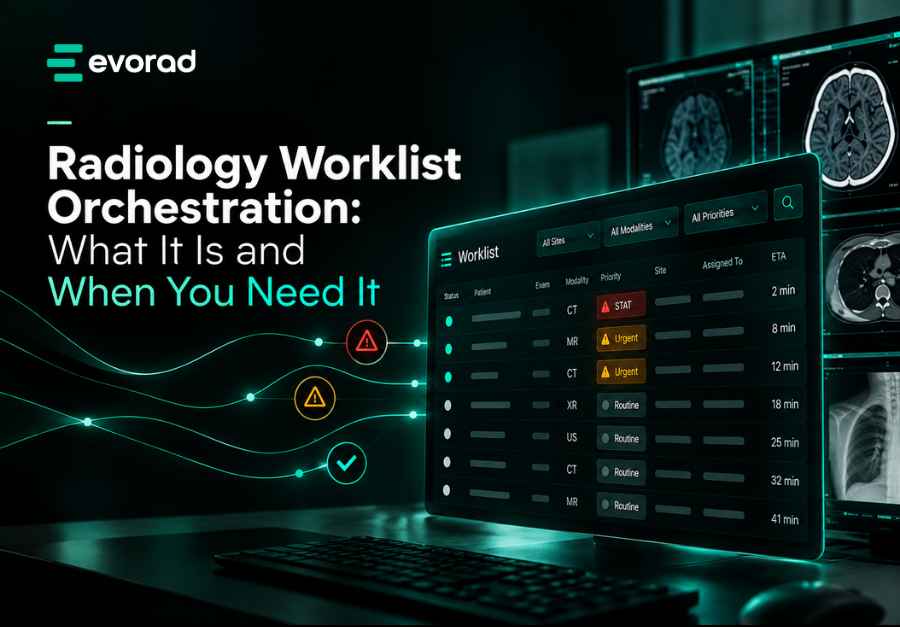
In short: Radiology workflow orchestration is a rule-based layer that decides which radiologist or reader group sees each study, and in what order, using study metadata such as modality, body part, referring site and clinically assigned priority. A PACS worklist lists studies; orchestration distributes them, applies fallbacks and escalates anything waiting too long.
Most radiology departments already have a worklist. It sits inside the PACS or RIS, it shows unread studies, and radiologists pick from it. For a single site with a stable team, that is often enough.
The trouble starts when the reading operation outgrows the worklist: more sites, contracts, subspecialists and remote readers. Then the question is no longer “what is unread?” but “who should read this, now, and what happens if they cannot?” Answering that consistently is what radiology workflow orchestration is for.
What is radiology workflow orchestration?
Radiology workflow orchestration is the logic that assigns and orders reading work across people, sites and systems. It helps to separate three things often blurred together:
- The worklist – the list a radiologist sees.
- Prioritisation – the order of items on that list.
- Distribution – which list an item lands on in the first place.
IHE’s Prioritisation of Worklists for Reporting (POWR) profile reflects this. It defines a “Prioritizer” that gathers factors such as order priority, indication, patient type and modality but leaves the business logic open: the profile “does not place requirements on how the prioritiser chooses to order the items on the reading worklist” [2]. That open business logic is exactly where orchestration lives.
How is orchestration different from a PACS worklist?
A PACS worklist shows studies; an orchestration layer decides where they go and when they move. The two work together rather than competing. See also what PACS does in radiology and why fragmentation is a real issue in radiology workflow.
| Typical PACS worklist | Orchestration layer | |
|---|---|---|
| Main job | Display unread studies, often with filters. | Route and order studies across readers and sites |
| Who chooses the next study? | Usually the radiologist, from a shared list | Rules propose assignment; radiologists can still choose. |
| Scope | Often one PACS or one site | Across sites, contracts and, in some cases, several PACS |
| Reader logic | Saved filters per user | Reader groups by subspeciality, site, licence, shift |
| Time awareness | Sort by age or priority. | Time-based escalation and reassignment rules |
| Fallbacks | Manual: someone notices and reassigns | Defined: next group, on-call, supervisor alert |
Saved filters rely on each radiologist maintaining their own view. Orchestration moves those rules to one governed place, so the operation behaves the same at night as by day.
What are the signs you need radiology workflow orchestration?
You probably need orchestration when assignment depends on people remembering rules rather than systems applying them. Common signs include:
- Coordinators reassign studies by hand, using spreadsheets, chat or memory.
- Subspeciality studies are read by generalists, not by policy but because the subspecialist did not see them in time.
- Readers cherry-pick, leaving complex or low-value studies to age at the bottom of the list.
- Urgent studies depend on vigilance – they are visible only if someone happens to sort the list correctly.
- Licensing or contract rules live in someone’s head, such as “Dr A cannot read for site B”.
- You read for several sites or PACS, each with its own list, so no one sees total demand. (Our guide to multi-site radiology operations covers the wider operating model.)
- Turnaround commitments are missed without warning, because nothing flags a study until it has already breached. See how to set and measure radiology turnaround-time SLAs.
How does radiology workflow orchestration work?
Orchestration works by reading study metadata, matching it against ordered rules and placing the study with a reader group, with timers that act if the study is not picked up. The building blocks are consistent across most implementations.

1. Metadata in: Orchestration reads information that already travels with the study and order: modality, body part, study description, referring site, patient type and priority. In HL7 v2 orders, priority is carried in the TQ1 segment’s priority field, which “describes the urgency of the request” and defaults to routine when blank [4]. In DICOM, the Requested Procedure Priority attribute (0040,1003) takes values such as STAT, HIGH and ROUTINE [5]. For a primer, read DICOM, HL7 and FHIR explained.
2. Reader groups. Most designs route to groups rather than individuals – neuro, MSK, a specific contract, readers licensed for a given country, and tonight’s on-call pool.
3. Ordered rules. Rules are evaluated top to bottom: the first match wins. Specific rules (paediatric neuro MR from site X) sit above general ones (all MR).
4. Fallbacks and time-based escalation. If no one in the group is available, or a study waits too long, it moves to a wider group or triggers an alert. IHE’s Remote Reading Workflow profile illustrates the same idea for remote reading tasks: an urgent task can carry “Urgency = STAT” together with an expected completion time [3].
5. Human control. Orchestration proposes; radiologists and coordinators retain the ability to choose, reassign or escalate. POWR explicitly allows a user to select an item other than the top one [2].
Does orchestration decide which studies are urgent?
No. Urgency is a clinical decision made by the referring clinician or site, typically when the order is placed or reviewed; the orchestration layer carries and displays it. Its job is to make sure a study already marked STAT sits at the top of the right list and escalates if it waits. Radiology workflow orchestration does not judge urgency or detect findings, so responsibility for urgency stays with clinicians and for the report with the radiologist. For a deep dive, see STAT prioritisation in teleradiology.
How does orchestration fit with your existing PACS and RIS?
Orchestration usually sits alongside existing systems rather than replacing them. IHE’s Scheduled Workflow profile already describes how ordering, scheduling, acquisition and archiving information passes between HIS, RIS, PACS and modalities [1]. An orchestration layer consumes that information and adds distribution logic on top. The practical questions are about integration: how it reads from each PACS, whether it handles more than one, and where radiologists see the worklist. If your team works across several logins today, read how a unified teleradiology platform ends the multi-login workflow.
Where Evorad fits
This is the problem Evorad’s maestro radiology workflow orchestration layer is built for. maestro is vendor-neutral: it connects to existing PACS through an API and overlays them without requiring changes and embeds them into the RIS. A configurable rule engine works from study metadata to organise worklists by reader group, subspeciality and radiologist availability, and applies time-based routing rules. Studies already designated STAT through clinical review by the referring clinician or site are placed at the top of the worklist; maestro does not decide urgency itself. Radiologists view the worklist in the Evorad exams portal. For distributed reading groups, see our page for teleradiology groups.
Related guides

Frequently asked questions
What is the difference between a worklist and workflow orchestration?
A worklist is the list of studies a radiologist sees. Workflow orchestration is the rule-based logic that decides which list a study lands on, where it sits, and what happens if it is not picked up in time. You can have a worklist without orchestration, but orchestration always produces worklists as its output.
Is radiology workflow orchestration only for teleradiology?
No. It is most visible in teleradiology because groups read for many sites under different contracts, but hospital networks, imaging centre chains and departments with several subspecialty teams face the same assignment problem. Any operation where “who should read this?” depends on more than one rule can benefit from radiology workflow orchestration.
What data does orchestration need?
At minimum, consistent study metadata: modality, body part or study description, referring site, patient type and the clinically assigned priority from the order. Reader data is also needed – subspecialty, site permissions, licensing and availability. Inconsistent study descriptions are a common weak point and are worth fixing before or alongside roll-out; our article on study description normalisation explains why.
Do we need to replace our PACS to add orchestration?
Usually not. Orchestration can be added as a layer that reads from existing systems through integration interfaces, which is particularly relevant if you have recently renewed a PACS contract or run more than one PACS. Evaluate how the layer integrates, what it needs from each system and how it handles downtime.
If your reading operation is outgrowing manual assignment, see how a rule-based worklist layer could fit your current set-up.
Sources
- Scheduled Workflow (SWF) profile, IHE International wiki. https://wiki.ihe.net/index.php/Scheduled_Workflow
- IHE Radiology Technical Framework Supplement: Prioritization of Worklists for Reporting (POWR), Rev. 1.1 – Trial Implementation, IHE International, 22 August 2023. https://www.ihe.net/uploadedFiles/Documents/Radiology/IHE_RAD_Suppl_POWR.pdf
- IHE Radiology Technical Framework Supplement: Radiology Remote Reading Workflow (RRR-WF), Rev. 1.1 – Trial Implementation, IHE International, 14 December 2015. https://ihe.net/uploadedFiles/Documents/Radiology/IHE_RAD_Supp_RRR-WF.pdf
- TQ1 – Timing/Quantity segment (TQ1-9 Priority), HL7 Europe v2+ refactored demo site. https://hl7.eu/refactored/segTQ1.html
- DICOM PS3.3, Section C.4.11 (Requested Procedure Priority, Reporting Priority), NEMA, current edition. https://dicom.nema.org/medical/dicom/current/output/chtml/part03/sect_C.4.11.html